CADENCE

Cadence stops AI agents from shipping work they only claim is done — a DRAFT→BUILD→SETTLE loop whose quality gates re-check your acceptance criteria and refuse to settle when they don’t pass.
“Your CI is green. Cadence still said no.”
An agent hits a failing test, guts the assertion, and leaves a plausible excuse (// flaky rounding on some platforms? disabling for now). The suite goes green, tasks get marked DONE. Then cadence settle run --auto refuses anyway — naming the specific AC and the specific dodge, exit 1. Fix the bug for real, restore the assertion, and it settles clean. Real output, offline, mock verifier, zero npm deps — run it yourself: docs/DEMO.md → (full 4-beat narrative) or examples/demo-test-gutting/run-demo.sh (replay it locally).
Also see: the $100/3 demo (arithmetic bugs, not agent cheating)
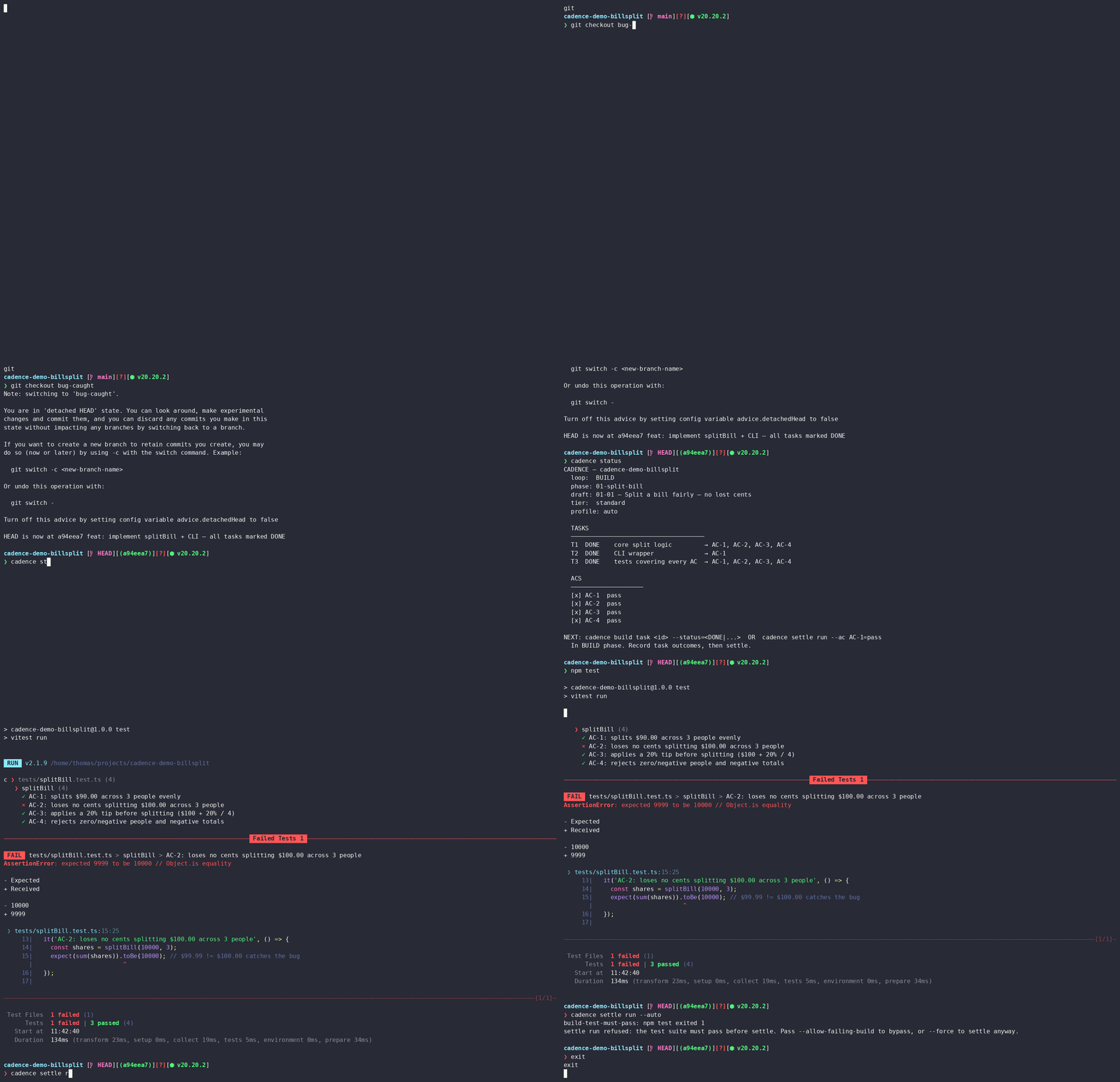
Above, the always-fire build-test-must-pass gate blocks a plausible lost-penny bug in a bill-splitter — $100.00 split 3 ways summing to $99.99. The AI marked the task DONE; the gate didn’t agree, and refused to close the loop. The demo repo carries the story past the block — the fix, then a clean settle once $100.00 actually splits to $100.00 — with real git history and reproduce-it-yourself steps: cadence-demo-billsplit →
For technical reviewers
Section titled “For technical reviewers”Cadence is an open-source TypeScript developer tool for AI-assisted software workflows. It uses a DRAFT→BUILD→SETTLE loop with configurable quality gates to verify declared acceptance criteria before work is considered complete. It can be driven from the CLI, Claude Code, Codex, or any MCP-capable host through its local MCP server.
Problem. AI coding agents can produce plausible work and mark a task complete before the promised behavior is actually verified.
Solution. Cadence wraps AI-assisted development in a DRAFT→BUILD→SETTLE loop. Work begins with declared acceptance criteria, progresses through explicit tasks, and cannot settle until configured gates re-check the state of the work.
Why it matters. Cadence gives teams a practical control layer for adopting AI coding agents without treating the agent’s self-report as proof.
Architecture at a glance. One core engine is exposed through the CLI, host adapters (Claude Code, Codex), and an MCP server. The same loop and gate logic stay authoritative across every surface.
flowchart LR  Human[Human operator] --> Surface{Entry surface}  Agent[AI agent] --> Surface
  Surface --> CLI[cadence CLI]  Surface --> Hosts["Host adapters<br/>Claude Code + Codex"]  Surface --> MCP[cadence mcp serve]
  CLI --> Core["Core engine<br/>DRAFT → BUILD → SETTLE"]  Hosts --> Core  MCP --> Core
  Core --> State[(.cadence state + artifacts)]  Core --> Gates[Quality gates]  Gates --> ACs[Acceptance criteria]  Gates --> Tests[Test / AC evidence]  Gates --> Verifiers["Verifier providers<br/>mock / anthropic / local / host-cli"]
  Gates --> Refuse[Refuse to settle]  Gates --> Settle[Settle phase]
See GitHub Releases for package changelogs, npm publication status, and release verification notes.
Why this exists
Section titled “Why this exists”Cadence grew out of working with GSD (Get Shit Done) — a planning framework that produces genuinely disciplined work, but at a real cost in tokens, wall-clock time, and constant back-and-forth. I wanted that discipline without that cost.
But the cost wasn’t the real trigger — it was what happened at the end of the loop. GSD and Superpowers both build in real discipline: planning up front, TDD cycles, checkpoints along the way. Both also ask the agent to verify its own work before calling it done. Neither, though, re-derives “done” from the actual state of the repo, independent of what the agent says it saw. An agent that’s convinced itself the tests pass — or quietly gutted the one that didn’t — still gets to mark the task complete, and nothing downstream catches it.
That’s the gap Cadence closes. It isn’t GSD-lite: it keeps the quality gates that re-check your acceptance criteria, but adds a settle step that never takes the agent’s self-report as proof — it re-derives each AC’s PASS from real evidence (task state, test results, diffs) and refuses to close the loop when the evidence doesn’t back the claim. The gate set is configurable per change too, so a complex, risky change gets the full battery and a one-line fix doesn’t pay for it. Same rigor GSD has, plus the verification neither GSD nor Superpowers do, minus the drag.
One engine, three surface categories
Section titled “One engine, three surface categories”Cadence has one core engine and three surface categories — CLI, host adapters, and an MCP server — for four current entry points:
- The
cadenceCLI is the engine — it implements the DRAFT→BUILD→SETTLE loop and all quality gates. You run it in a terminal; a human operator or an AI agent can drive it. Completely host-agnostic. - Host adapters wire the same engine into a specific coding agent’s lifecycle — currently two:
- The
cadence-host-claude-code installadapter wires Claude Code via lifecycle hooks and 15 slash commands. Claude Code is the reference adapter for ambient edit-time gates (boundary checks, anomaly detection as you edit). - The
cadence init --host codex/cadence-host-codex installpath wires the OpenAI Codex CLI via lifecycle hooks and global prompt commands. Run the bootstrap before opening Codex for the first time so Codex sees the commands on its first useful session. It is a shipped conformance consumer of the host-adapter contract, and also supports ambient edit-time boundary checks via its own hooks.
- The
cadence mcp serveexposes the engine as a local MCP server over stdio, so any MCP-capable host (Claude Desktop, Cursor, other agents) can drive the loop with no bespoke adapter. It covers the imperative loop only (command-boundary gates run; ambient edit-time gates need host hooks). See MCP server.
How it compares
Section titled “How it compares”Cadence is a verification layer, not an agent and not a CI service. The point of difference is what it checks: the specific acceptance criteria you declared for a unit of work, re-derived from real task state — not just “did the build stay green.”
| What it checks | Where Cadence differs | |
|---|---|---|
| CI / a test runner | The suite passes on a branch, after you push. | CI has no idea what this task promised. Cadence re-checks each declared acceptance criterion before it will even close the loop, and runs the suite as one of several gates. |
| A linter / pre-commit hook | Style and static rules on the diff. | Those never ask “was the work actually accomplished?” Cadence gates the claim of done against the criteria, not formatting. |
| An agent harness / framework | Orchestrates the agent doing the work. | Cadence is adversarial to the agent’s self-report. It’s host-agnostic — a CLI that sits behind any agent (or none) and refuses to accept an unverified “done.” |
| A heavyweight planning framework (e.g. GSD) | Runs a full, fixed discipline on every change. | Cadence keeps the rigor but makes the gate set configurable per change (profile × tier) — you pay only for the gates a change actually needs. GSD’s discipline without GSD’s wall-clock cost. |
The core primitive nothing else has: refusal-to-settle on re-verified declared criteria.
The agent isn’t believed; the state is.
Heads-up on the default verifier. Out of the box every gate uses
mock, a deterministic offline placeholder that only checks each acceptance criterion links to a test — it is not real verification. Runcadence activateto turn on a real AI verifier (Anthropic, a local model, or your host CLI);cadence doctortells you whether real verification is actually wired.
Quickstart
Section titled “Quickstart”Zero setup, one command: run the CLI with no arguments and it drops straight into a real, offline refuse-then-succeed DRAFT→BUILD→SETTLE loop in a disposable sandbox, then cleans up after itself:
npx -y @thomas-powers-jr/cadence-core(Same walkthrough, run explicitly as cadence demo.)
For daily use, install the CLI globally (requires Node ≥ 22):
npm install -g @thomas-powers-jr/cadence-coreNew to CADENCE? Run cadence start — a guided menu that picks the right setup
command for what you’re doing. (Once you’re set up, cadence quickstart is the
read-only map of where you are and your next moves.)
Drive a real phase
Section titled “Drive a real phase”cadence initcadence draft new --title "Fix login timeout" --template bugfix# edit the generated DRAFT: templates are scaffolds, not proofcadence draft approve 01-fix-login-timeout 01# ^ non-TTY (CI/agents)? add --no-approve — see the gate-profiles note belowcadence build task T1 --status=DONEcadence settle run --auto# ^ Cadence refuses: AC-1 has no test. That's the point — it won't settle# unverified work. As the operator, you can verdict the criterion yourself:cadence settle run --ac AC-1=passcadence init asks nothing — it derives the project name (from package.json
or the directory) and the gate profile (from git history). Already have an
ANTHROPIC_API_KEY? Add --activate to turn on real verification in the same
step (the key is never stored). In a Claude Code workspace (.claude/ present),
add --wire-host to install the adapter in the same step too. For Codex, run
cadence init --host codex before opening Codex so hooks, prompt commands, and
AGENTS.md are ready for the first session.
Driving CADENCE from Claude Code? Wire the adapter into a project:
npx @thomas-powers-jr/cadence-host-claude-code installDriving it from another MCP host (Claude Desktop, Cursor, an agent)? Point the host at the MCP server — no adapter needed:
{ "mcpServers": { "cadence": { "command": "cadence", "args": ["mcp", "serve"] } } }Heads-up — gate profiles and
approve:cadence initsuggests a gate profile from repo maturity — a repo with ≥20 commits getsstandard, a younger repo getsauto(override with--gate-profile). The profile sets how strictdraft approveis:
auto—approveruns non-interactively (good for solo and agent loops).standard/strict—approveis gated behind an interactive prompt. In non-TTY contexts (CI, agents) it refuses unless you pass--no-approve.
--localwrites machine-absolute paths — do not commit it.cadence-host-claude-code install --localbakes absolute paths to this machine’s workspace into the settings file. Add the settings file (e.g..claude/settings.local.json) to.gitignore; other clones/machines cannot resolve those paths.
More ways to try it
Section titled “More ways to try it”Prefer the pre-cadence demo name? cadence tutorial still works — same
walkthrough, no install, no repo writes, run explicitly by its original name:
npx -y @thomas-powers-jr/cadence-core tutorialWant the demo seeded into your own repo instead of a throwaway sandbox?
--demo seeds a ready-to-approve phase so there’s nothing to hand-edit:
mkdir my-app && cd my-appcadence init --demo # zero prompts: name + gate profile are derivedcadence draft approve 01-demo 01cadence done T1cadence settle run --ac AC-1=passFull user guide
Section titled “Full user guide”See docs/README.md for the complete user guide:
- Quickstart — no-install demo, first real template, and full loop walkthrough
- Concepts — the loop, gates, profiles, and single-commit convention
- CLI guide — all subcommands and flags
- Claude Code integration — hooks and slash commands
- Host adapters — the shared adapter contract used by Claude Code and Codex
- MCP server — drive the loop from any MCP host (
cadence mcp serve) - Providers — mock (offline default), Anthropic API, local OpenAI-compatible endpoints, or your host CLI
- Command reference — exhaustive CLI reference
- Config reference — full
.cadence/config schema - Release process — maintainer checklist for npm, tag, and GitHub Release integrity
Continuous integration
Section titled “Continuous integration”.github/workflows/ci.yml runs lint → typecheck → test → build on every PR and push to main, across Node 22 on Ubuntu.
Enforcing the gate. A tracked hook .githooks/pre-push (wired via git config core.hooksPath .githooks) runs the full pnpm turbo run lint typecheck test build before any push that updates main and aborts on failure. Bypass deliberately with git push --no-verify.
About the name
Section titled “About the name”CADENCE is named for the rhythm of its core loop — the steady DRAFT → BUILD → SETTLE cadence it keeps on every phase of work. Earlier drafts carried a backronym; it’s been retired as a forced fit. The word — the rhythm — is the keeper.
License
Section titled “License”MIT